

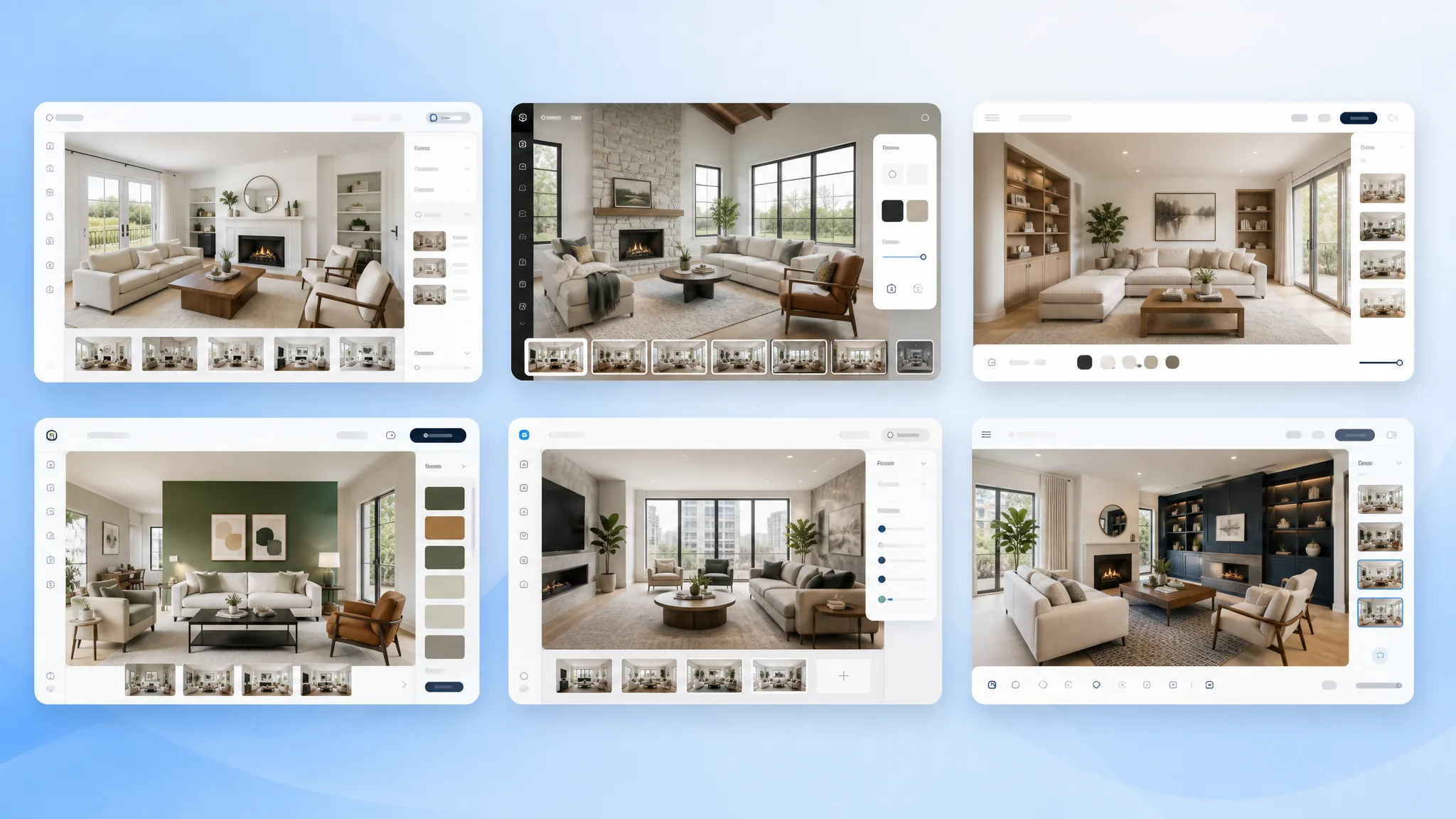
TL;DR. The best virtual staging software for real estate agents in 2026 is AgentLens for monthly volume. It gives 10 free credits, costs $9.90 a month, runs as a Chrome extension, and adds the MLS watermark for you. Use Virtual Staging AI for one-off jobs at $16 per image. Use REimagineHome when you also stage exteriors. Skip BoxBrownie unless you need a full real estate media studio. The pricing table below shows all 5 plans at a glance.
Vacant listings sell slower and for less. Virtual staging software fixes that. You upload a photo. The AI fills it with furniture. The staged image is ready in seconds. No rental truck. No staging fee.
The category has expanded fast. A year ago the choice was Photoshop or one or two rough AI tools. In 2026 we count at least six options that pass a real listing test. This is the head-to-head.
We ran the same vacant 1,800 sqft Austin living room photo through all six tools on May 19, 2026. Same style preset (Modern Farmhouse). Pricing comes from each vendor's public page that day. For the full step-by-step workflow with camera angles, see our how to do virtual staging guide.
Pricing at a glance: 5 tools, one table
We built this side-by-side so you can find the right fit for your volume in 10 seconds.
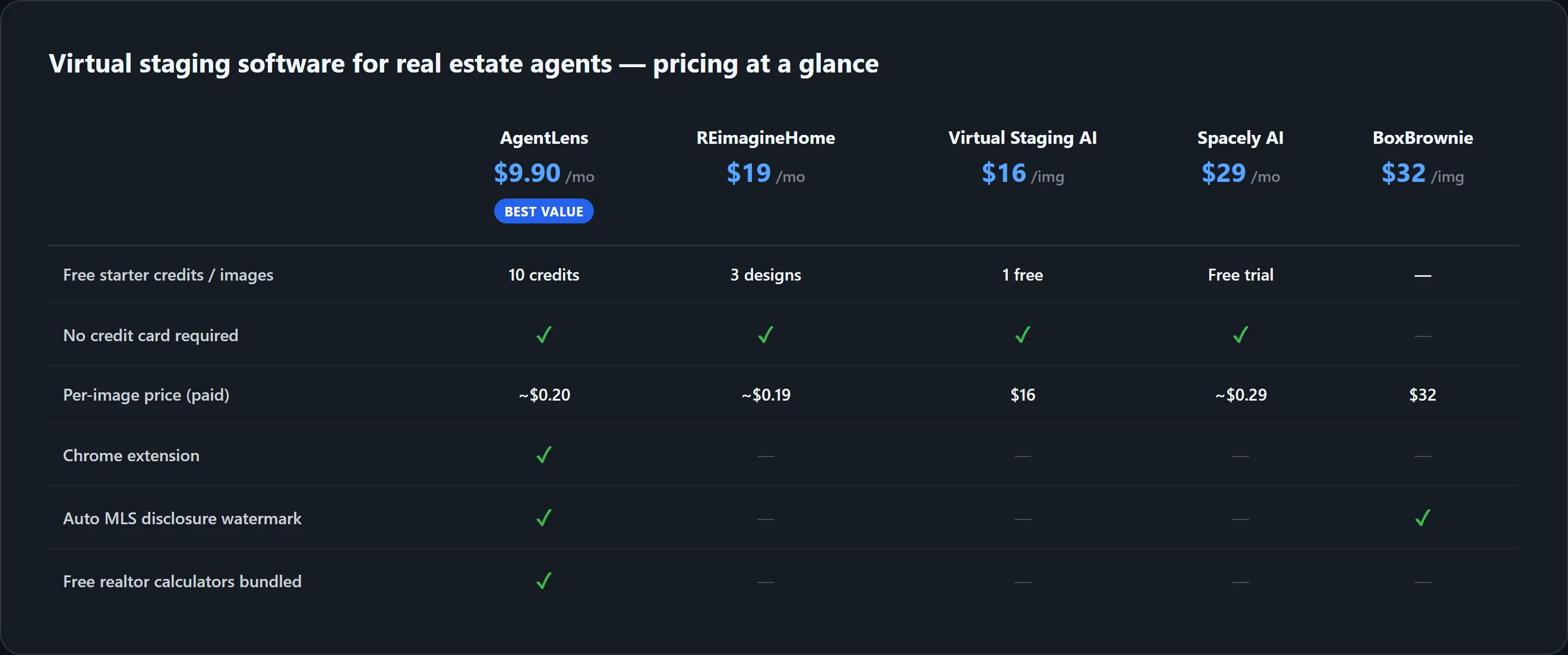
Two rules of thumb. Stage more than 4 rooms a month? A subscription beats per-image pricing. Stage 1 to 3 rooms a quarter? Virtual Staging AI's per-image plan saves money. AgentLens is the only tool here with a Chrome extension and an auto MLS-disclosure watermark. We cover both in the AgentLens section below.
Watch: how a producing agent picks a virtual staging tool
The video below is from a working agent. He tested six staging tools on one listing photo. He breaks down photo quality and workflow friction for each one. It is the most-watched comparison on this topic right now.

His verdict matches our testing: the AI tools are now good enough that the bottleneck is the source photo and the style choice, not the model. Pick a tool, learn its quirks, stay with it.
Why virtual staging beats traditional in 2026
Traditional in-person staging still works for $1M+ listings. The buyer there expects a fully merchandised walkthrough. For everything under that, the math has shifted.

Five vacant rooms stage out at about $1 in credits with the right tool. The same listing in physical staging costs $1,500 to $3,000 for a six-week rental. The ROI math is not close. The trade-off is the in-person walkthrough still shows an empty home. Plan for that. Clean. Paint. Add a small physical touch up before showings.
For a deeper breakdown of the cost side, see the virtual staging cost guide.
AI virtual staging vs Photoshop manual editing
A common question from agents who already use Photoshop for listing photos. The answer for vacant-room staging is clear.
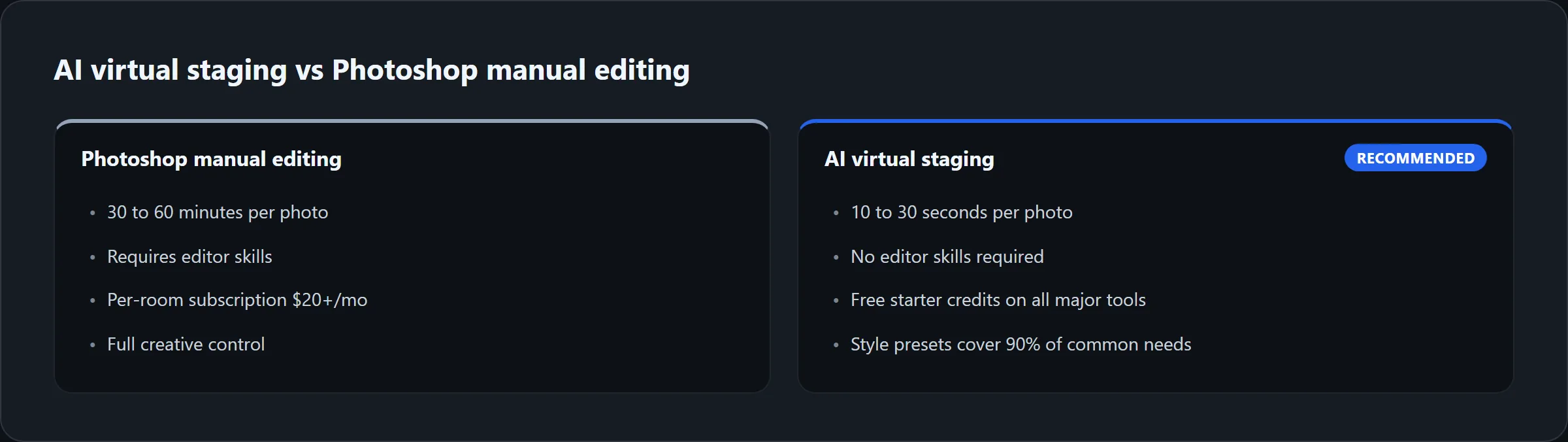
AI wins on speed and skill barrier. Photoshop wins on full creative control. For 99 percent of listing-photo staging, AI is the right tool. Reserve Photoshop for the work AI tools do not do well. That includes complex sky replacement, exposure blending, and vertical line correction.
What real agents are saying about virtual staging in 2026
A December 2025 r/realtors thread asked the same question. "Is there such a thing as a good virtual staging company?" The replies were practical. Most agents picked the same names.
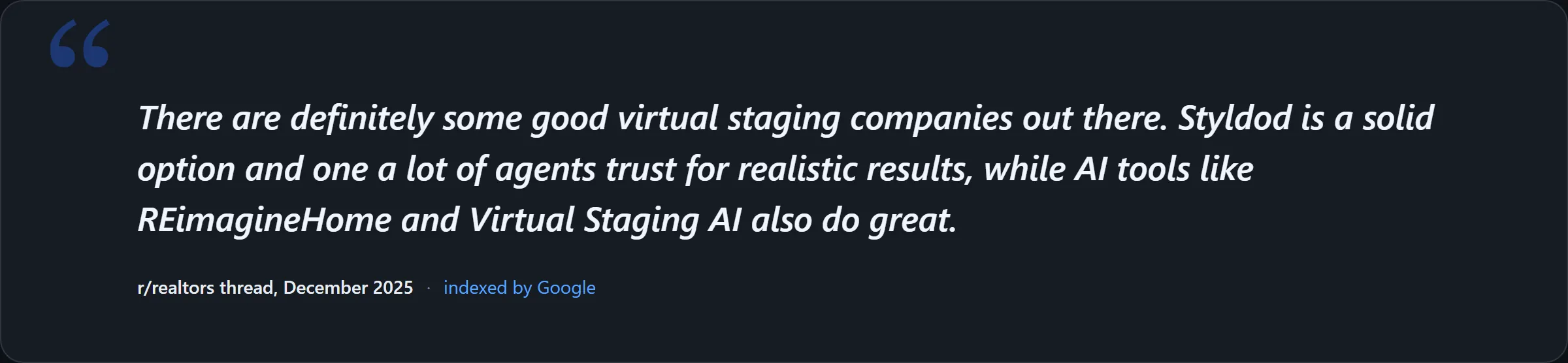
r/realtors · "Is there such a thing as a good virtual staging company?" · posted December 2025. A working-agent discussion on which virtual staging tools deliver realistic results. Read the original thread on reddit.com for the full set of replies and live comment scores. The pattern across the recent threads is the same. AI tools have closed the quality gap with human-edited staging. Agents now care more about workflow friction than tool choice.
The 6 virtual staging software tools we tested
AgentLens (best for monthly volume)

Pricing: 10 free credits on signup with no credit card. Paid plans from $9.90/mo (50 credits) to $50/mo (500 credits). Annual billing knocks 20 percent off.
Best for: agents who stage two or more vacant listings a month. The pitch is staying inside Chrome. No separate web app. The extension installs from the Chrome Web Store. The side panel handles upload and generation in the same tab.
What we like: the 10 free credits stage two full vacant listings (5 rooms each). You pay nothing to start. The MLS-disclosure watermark is added on every output. You do not need to label photos in Canva.
What to know: Chrome only. Edge and Brave work too since they share the Chromium base. No standalone web app. iPad-first workflows need to plan around this. The model uses PiAPI and Fal.ai under the hood.
REimagineHome (best when you also stage exteriors)
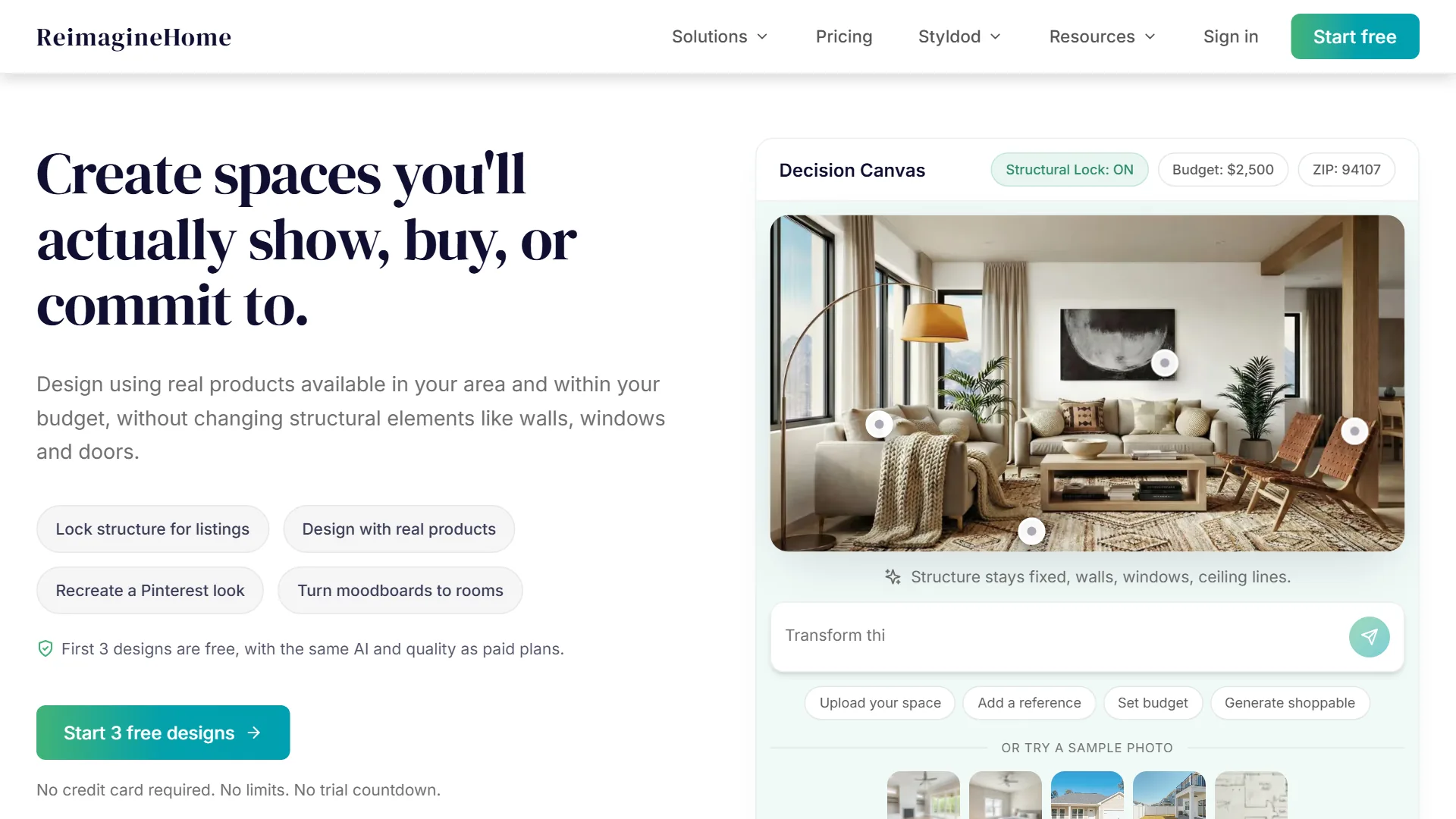
Pricing: 3 free designs on signup. Paid plans from $19/mo with watermark removal.
Best for: agents who stage interiors and exterior shots in the same listing. REimagineHome handles exterior cleanup better than the rest. That covers sky replacement, lawn green-up, and basic furniture removal. The catalog ties styles to budget and ZIP code, which is unusual.
What to know: the interface is heavier than AgentLens or Virtual Staging AI. The free tier is enough to test on one listing.
Virtual Staging AI (best for per-image jobs)

Pricing: one free image with no card. Per-image pricing around $16, or subscriptions from $16/mo.
Best for: agents staging fewer than 4 rooms a month. The per-image option beats a subscription on low volume. The flow is the simplest of the six. Upload, pick a style, download.
What to know: no Chrome extension. No auto MLS-disclosure watermark. Add the disclosure in Canva or Photoshop before upload.
Spacely AI (best for empty-room focus)
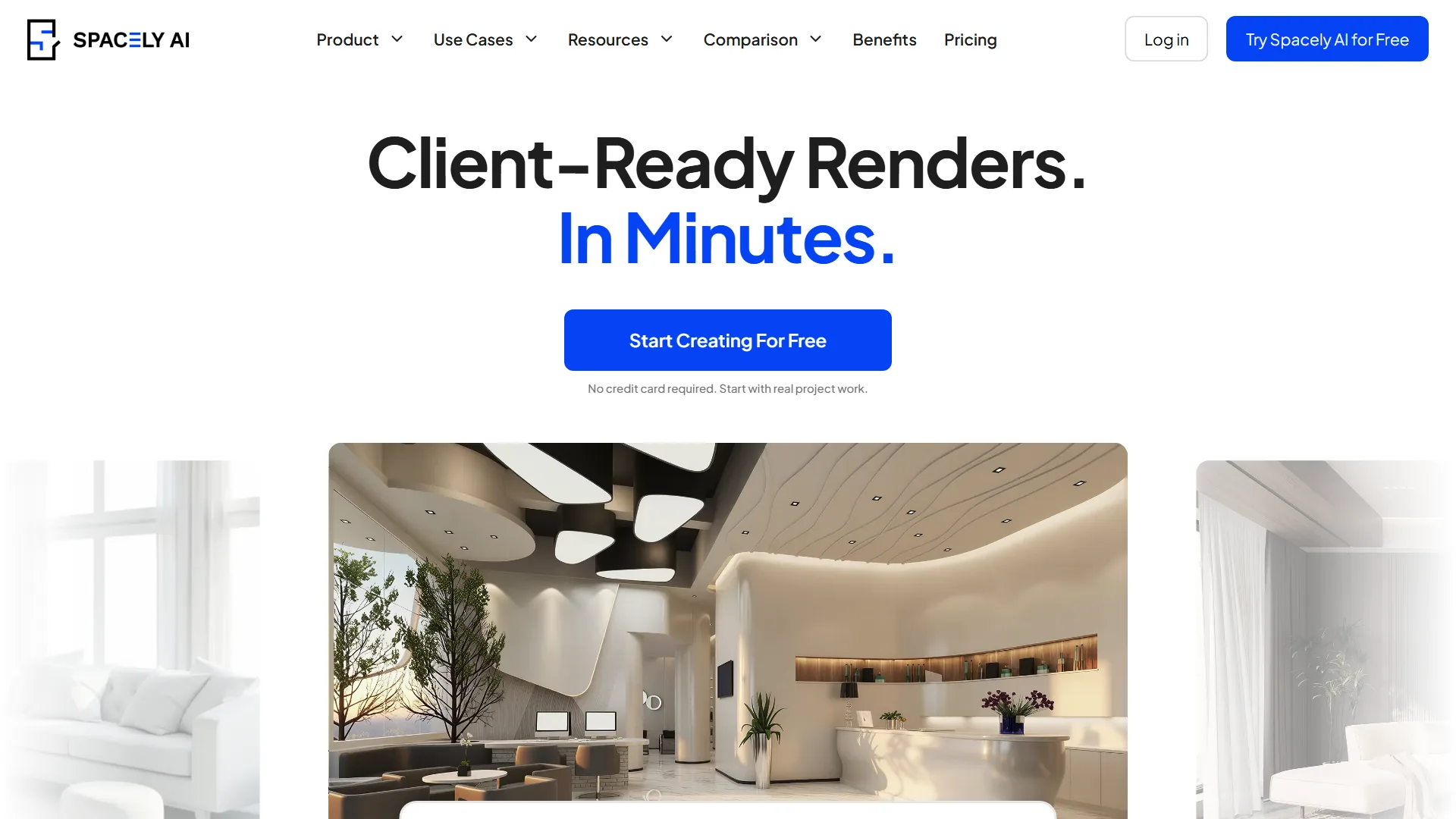
Pricing: free staging test without payment. Paid plans for higher volume.
Best for: agents whose vacant-room rate is high. Spacely's tool was built around empty rooms. Scale and proportions are tuned for vacant spaces. That fixes the most common AI artifact in this niche. An oversized bed in a small bedroom.
What to know: Spacely is part of a broader design AI suite. The staging tool is one product in their lineup. You may see UI prompts to upgrade to the full plan.
BoxBrownie (best for real estate media studio)
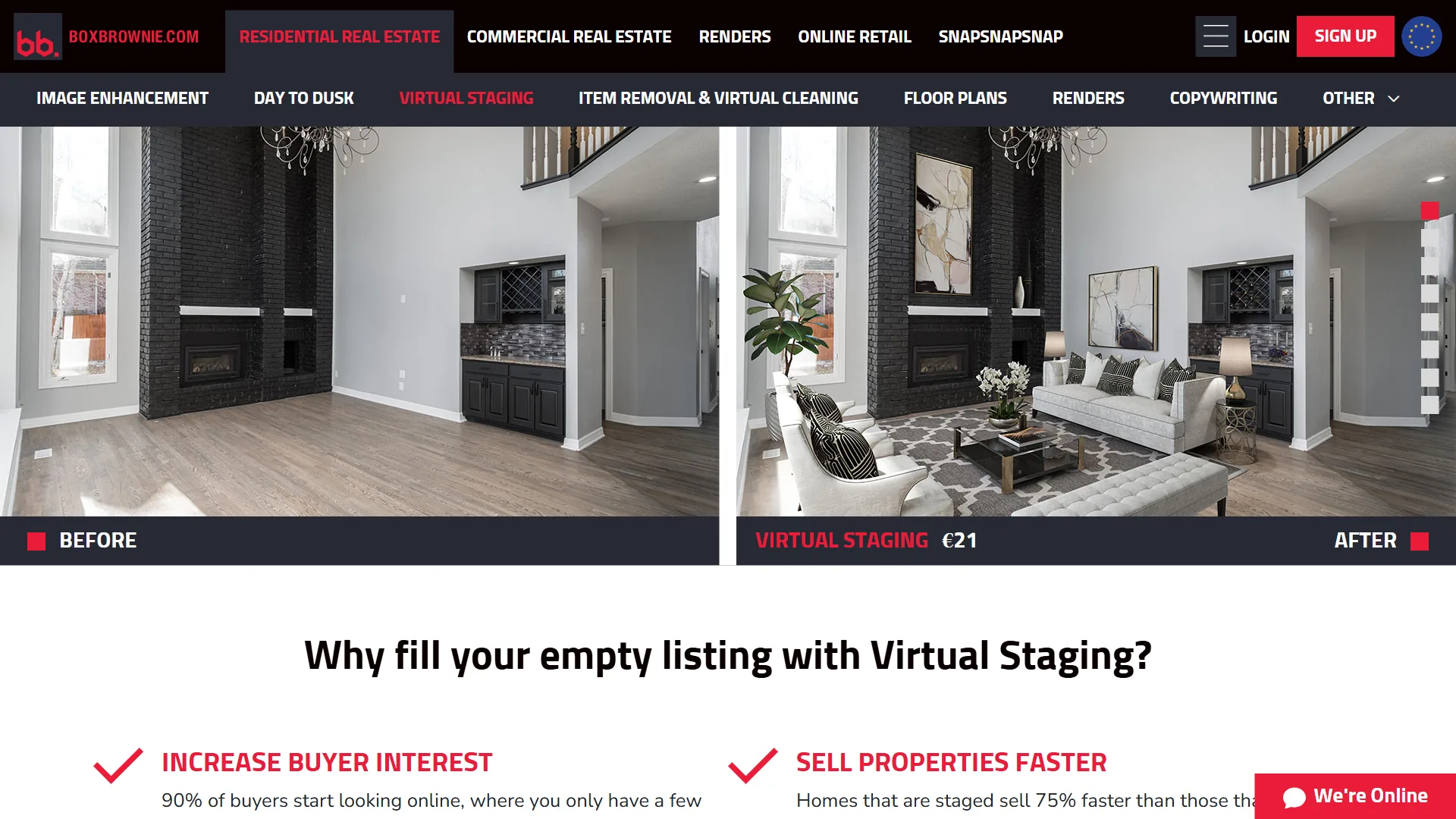
Pricing: $32 per image for virtual staging. Bundles for photo retouching, item removal, day-to-dusk conversion, and floor plan redraw.
Best for: agents who need a full media studio. That covers photo retouching, staging, item removal, and floor plan redraw. BoxBrownie's output is human-edited, not AI-generated.
What to know: the per-image price is the highest here ($32 vs $0.20 with AgentLens). Turnaround is hours, not seconds. Worth it on $1M+ listings where you want a fully styled media set.
ApplyDesign (best for free-tier evaluation)

Pricing: free trial available. Paid plans on the pricing page.
Best for: agents who want a no-friction way to test AI staging before paying anyone. ApplyDesign's homepage CTA is the most open of the six. Just "Try Now For Free."
What to know: smaller team than the rest. Style range is narrower. Good as a second test alongside one of the bigger tools, not as a primary choice.
The 4-step workflow that works on every tool
The tools differ in pricing and UI. The workflow is the same.

For the camera angles and the source-photo rules, see our step-by-step virtual staging guide. For the room-by-room order on vacant listings (living room first, primary bedroom second, dining third), see the virtual staging for vacant rooms playbook.
Try AI virtual staging free on your next vacant listing
10 free credits on signup. Enough to stage two full vacant listings (5 rooms each) before you pay anything.
Install the AgentLens Chrome extension. 10 free credits, no card.
How we tested
We ran the same vacant Austin living room photo through all six tools on May 19, 2026. Same Modern Farmhouse style. Each tool was scored on four criteria. Photo quality (no floating furniture, no doubled features, correct scale). Generation speed. Workflow friction from upload to download. Free-tier generosity. Pricing comes from each vendor's public page as of May 2026. We disclose that AgentLens is our own product. We ran the test photo through every competitor in a clean browser profile to keep the comparison honest.
Read more about how we evaluate AI staging tools. For the broader category roundup that places virtual staging in the full AI stack a working agent should consider, see the best AI tools for realtors 2026 pillar.
Last updated: May 19, 2026. Prices and feature lists are reviewed monthly. The screenshots in this guide were captured directly from each vendor's live homepage on May 19, 2026.
Frequently asked questions about virtual staging software for real estate agents
What is the best virtual staging software for real estate agents?
For monthly volume, AgentLens wins. It gives 10 free credits on signup. Per-image price is around $0.20. It runs as a Chrome extension. Its auto MLS-disclosure watermark saves a step. For per-image jobs, Virtual Staging AI wins on low volume. For exterior shots, REimagineHome wins on polish. There is no single best tool for every agent. Pick by volume and use case.
Is virtual staging software for real estate agents free?
Every tool in our test has a free tier. AgentLens gives 10 free credits with no card. REimagineHome gives 3 free designs. Virtual Staging AI gives one free image. Spacely AI offers a free test. ApplyDesign offers "Try Now For Free." BoxBrownie is the exception. There is no fully unlimited free virtual staging app for real estate in 2026. The free tiers exist to let you test the workflow on a real listing before you subscribe.
Does Zillow offer virtual staging?
Zillow does not offer virtual staging as a built-in service. Some Zillow Premier Agent packages bundle photography and staging through third-party partners. The staging itself is not generated by Zillow. Agents pick one of the standalone tools in this guide. They upload the disclosed photos to Zillow alongside the MLS upload.
Can I try virtual staging AI for free?
Yes, on first use. AgentLens gives 10 free credits at signup with no card. Virtual Staging AI gives one free image. REimagineHome gives 3 free designs. Spacely AI offers a free test. ApplyDesign offers a "Try Now For Free" landing page. Each free tier is enough to stage at least one room and decide whether the tool fits your workflow before subscribing.
Is virtual staging legal on MLS?
Yes, when disclosed. Most MLS systems allow virtual staging on listing photos. Each enhanced photo must be labeled. California's AB 723 made this explicit for AI-edited photos. Florida Realtors uses similar guidance. The standard fix is a small corner watermark reading "Virtually Staged." Add a sentence in the listing description noting which rooms were edited. AgentLens adds the watermark for you. Other tools need you to add it in Canva or Photoshop before upload.
How much does virtual staging cost on these tools?
About $0.10 to $0.20 per staged image on a subscription plan. That covers AgentLens, REimagineHome, and Spacely AI. Per-image pricing without a subscription runs around $16 (Virtual Staging AI). BoxBrownie's human-edited staging costs $32 per image. Traditional in-person staging costs $1,500 to $3,000 per home for a six-week rental. Low-volume agents save on per-image plans. High-volume agents save on subscriptions.
Which virtual staging software is best for vacant rooms specifically?
Spacely AI is built around empty rooms. Its scale is tuned for vacant spaces. That means fewer "oversized bed in small room" artifacts. AgentLens and Virtual Staging AI also handle vacant rooms well. They have bigger style ranges. For a deeper room-by-room playbook, see our virtual staging for vacant rooms guide.
Bottom line: pick by volume, not by feature checklist
Two questions pick the right virtual staging software for real estate agents. How many vacant rooms do you stage per month? If more than 4, take a subscription tool with the lowest per-image price. AgentLens is the cheapest in that group. If fewer than 4, take per-image pricing. Virtual Staging AI is the cleanest example. The other features are tie-breakers. Chrome extension, exterior staging, auto watermark. None are decisive on their own.
Start with the AgentLens 10 free credits. Two vacant listings in, you will know if the workflow saves the days on market it promised.
Related reading: If your showing is tomorrow and you need the listing photos done now, see How to Stage a Vacant Home With AI in 5 Minutes. The exact 5-step workflow with timings, plus the honest case for when AI is not the right tool.
Free Real Estate Tools
Explore our free calculators and AI tools for agents:
Transform Your Listings with AI
Apply professional virtual staging and enhancements in seconds. Start transforming your listings today.
Explore Virtual Staging Options
Start with our most popular room & style combinations: