


The "Good Bones" Crisis: Why Buyers Are Ghosting Your Fixer-Uppers
It’s 11 PM. A buyer is doom-scrolling Zillow in bed. They pause on your listing—great price, decent neighborhood. Then they swipe to photo #2: a kitchen stuck in 1995. Honey oak cabinets. Laminate counters. A fluorescent light box humming with despair.
In milliseconds, they calculate the headache: Finding a contractor. Living in dust. Hemorrhaging cash.
They don't see "potential." They see stress. And just like that, they swipe left.
In 2026, telling a buyer to "bring their imagination" is a strategy for failure. Buyers are exhausted and cash-strapped. If you want to sell the "ugly" house, you can't just sell the drywall—you have to sell the dream.
Here is the "Potential Marketing" playbook: a practical guide to marketing fixer upper homes that bridges the gap between a buyer's wallet and their lack of imagination.
1. The 2026 Reality: Buyers Are Broke But Picky
Let’s be real about the market. We are living in a brutal paradox. Interest rates are squeezing budgets, pushing buyers toward affordable inventory. Theoretically, this should make fixer-uppers fly off the shelf.
Data from Realtor.com backs this up: homes listed as "fixer-uppers" are getting 52% more page views than comparable homes
The discount is there—often 54% lower than move-in ready stock
But views don't equal offers.
Why? Blame HGTV.
For a decade, buyers have watched 30-minute episodes where a dilapidated shack turns into a farmhouse palace with zero stress. This has warped reality. Today's digital-native buyer expects high visual fidelity. They buy sneakers based on Instagram ads; they judge restaurants by TikToks. When they see peeling beige siding or stained carpet, they don't have the mental tools to look past it.
Surveys show over 56% of buyers demand "move-in ready" condition . They want the discount of a fixer-upper, but the visual polish of a turnkey.
Your job isn't to fix the house physically. It's to fix their vision.
2. The Psychology of the "No"
Why do buyers hate projects? It’s not laziness. It’s brain chemistry.
When a client walks into a dated 1980s living room, their brain has to do four hard things at once:
Delete the ugly furniture and wallpaper.
Retrieve memories of what "good" looks like.
Integrate those new images onto the current walls.
Price the renovation instantly.
That is a massive cognitive load. It leads to "decision fatigue." The brain gets overwhelmed and defaults to the safest answer: No.
The "Anchor" Problem
In sales, the first thing you see is the "anchor." If the first photo is a stained carpet, that negative feeling anchors the entire viewing. The buyer walks through the house looking for more reasons to hate it.
"Potential Marketing" resets the anchor. By showing a photorealistic "After" image alongside the "Before," you do the heavy lifting for them. You aren't asking them to imagine; you're asking them to choose.
<img src="visual-psychology-checklist.jpg" alt="Visual Psychology Checklist: Deletion, Retrieval, Integration, Pricing">
3. The Tool Landscape: Why Old Tech Fails
You know you need better visuals. But the tools available to agents have been... lacking. Let's look at the graveyard of "almost good enough" solutions.
The Old Guard: Physical Staging
Great for luxury. Terrible for fixers.
The Cost: $1,500 - $5,000 upfront.
The Flaw: You can't stage a renovation. Putting a $3,000 West Elm sofa in a room with peeling wallpaper doesn't hide the wallpaper; it just makes the sofa look sad.
Manual Virtual Staging (The "BoxBrownie" Model)
Companies like BoxBrownie use humans to manually edit photos.
The Good: High quality.
The Bad: Speed and Cost.
Verdict: Too Slow. Standard turnaround is 24-48 hours . In a hot market, waiting two days for photos—and another two days if you need a revision—is an eternity. Plus, virtual renovation costs $24 to $176 per image. Doing a whole house destroys your marketing budget.
Consumer Paint Apps (The "DIY" Trap)
Trying to save money with Sherwin-Williams or Behr apps? Don't.
Behr ColorSmart: Users report it crashes constantly and scans grey walls as "salmon pink" .
Benjamin Moore: The "Personal Color Viewer" requires you to manually trace walls with your finger. One review sums it up: "App is too stupid to select wall vs trim" .
Sherwin-Williams ColorSnap: Great paint, bad tech. The Match Pro device is notorious for connectivity issues .
Verdict: Unprofessional. These are for homeowners, not agents selling $500k assets.
4. The Solution: Agent Lens
This brings us to the tool that is actually built for the 2026 workflow: Agent Lens.
Agent Lens is a Chrome extension that uses Generative AI to understand the geometry of a room. It knows what a floor is. It knows what a cabinet is. And it costs pennies compared to the manual editors.
Why It Wins
Speed: 8-15 seconds per image. You can renovate a kitchen while standing in it.
Cost: On the Pro plan, it’s roughly $0.10 - $0.33 per image.
Volume: Because it's cheap, you don't have to pick just one "hero" shot. You can renovate every ugly room in the house.
The 3 Critical Modes for Fixer-Uppers
To execute "Potential Marketing," you need to use the right modes. Do not just generic "stage" the room. You need to fix the bones.
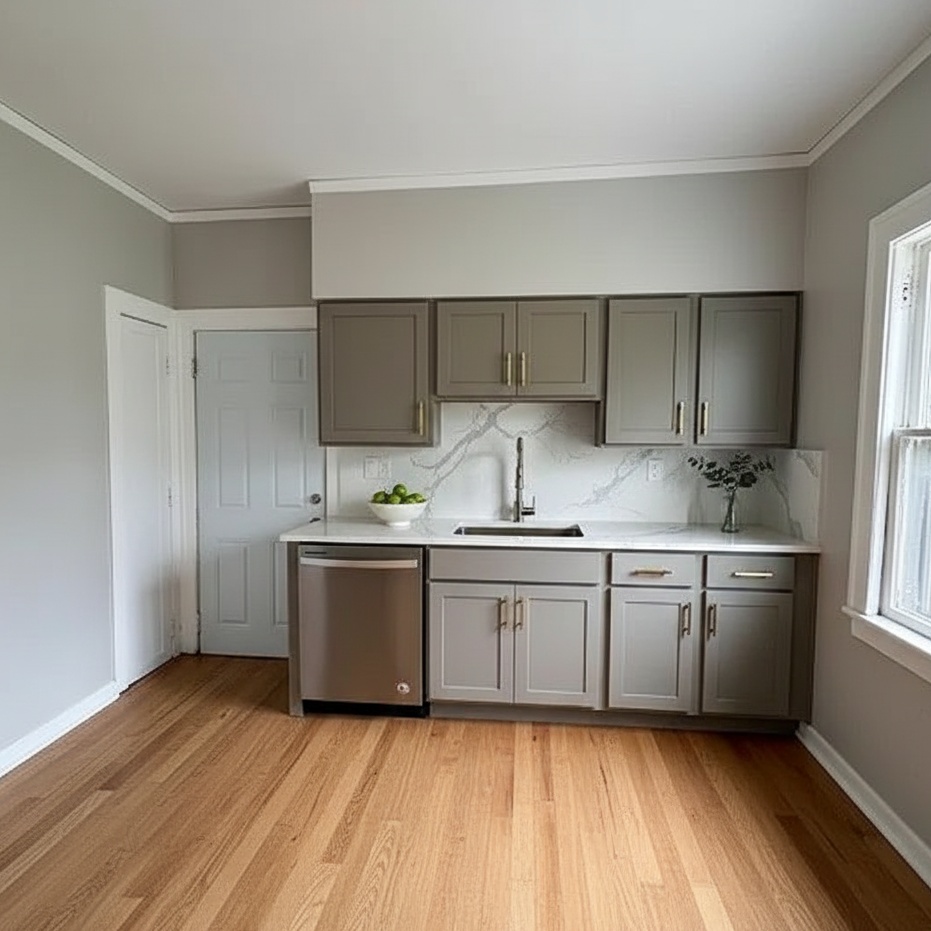
1. Kitchen Remodel (Mode 9)
The kitchen is the #1 dealbreaker.
The Fix: Use "Kitchen Remodel" mode.
What it does: It keeps the layout (sink and stove stay put) but resurfaces everything. It swaps Honey Oak for Sage Green. It turns laminate into Quartz.
Why layout matters: AI that moves plumbing is dangerous—it implies a $50k cost. Agent Lens keeps the "bones" intact, making the visualization realistic.

2. Interior Renovation (Mode 10)
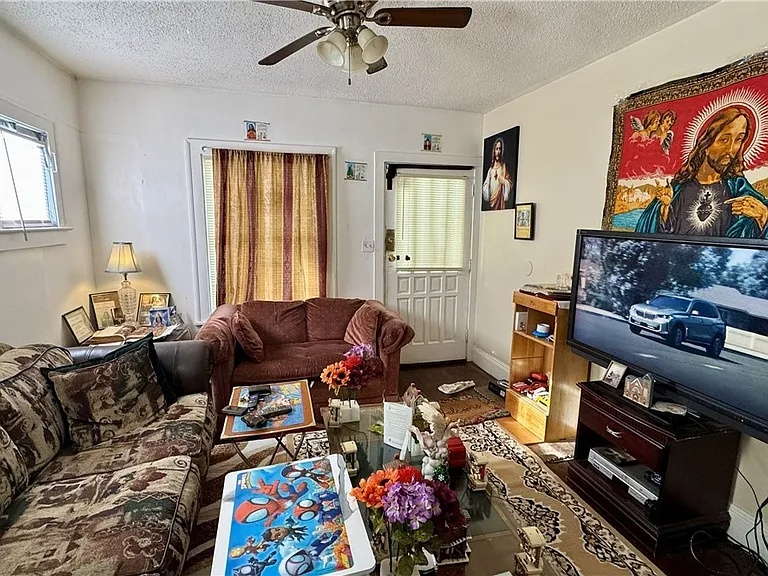
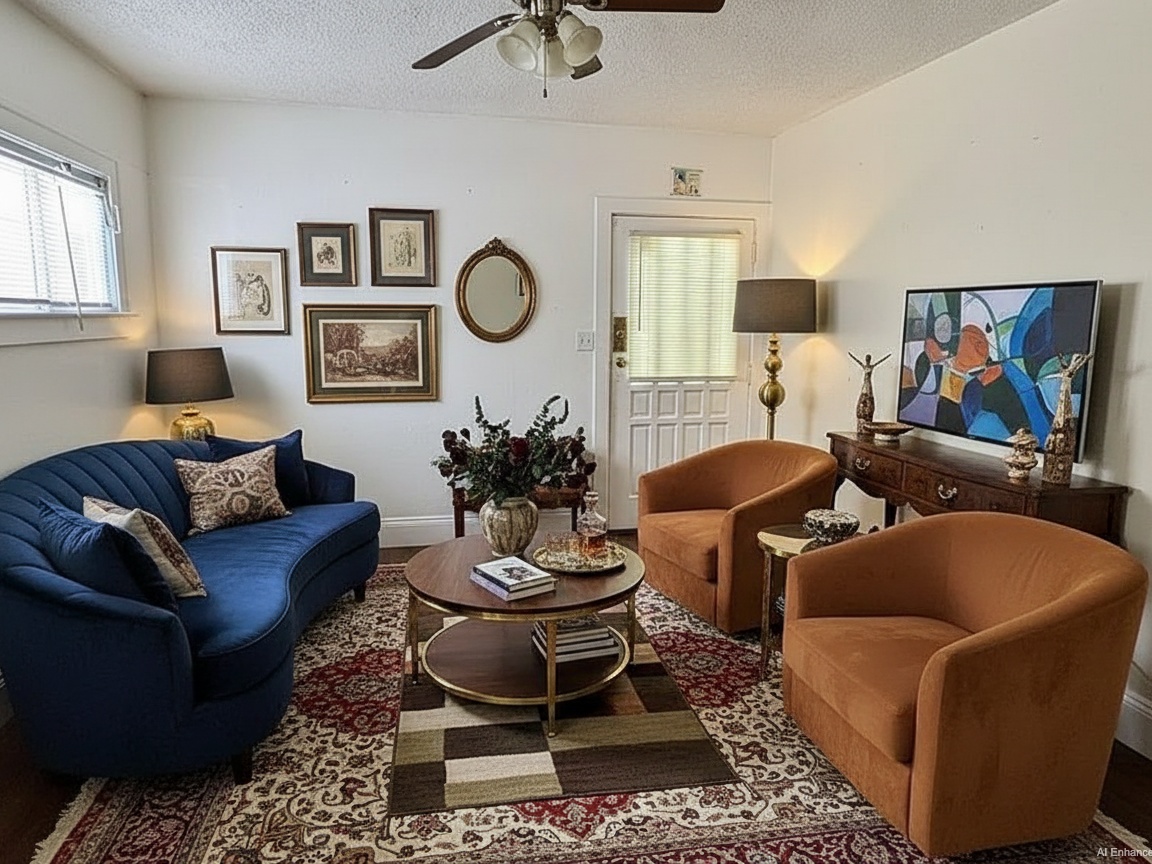
Use this for the "Grandma's House" living rooms.
The Fix: Use "Interior Renovation".
What it does: Strips wallpaper, paints walls, installs hardwood over shag carpet, updates lighting.
The result: It sells volume. Dark paneling makes rooms look small. White walls and wide-plank oak make them look huge.
3. Exterior Makeover (Mode 11)
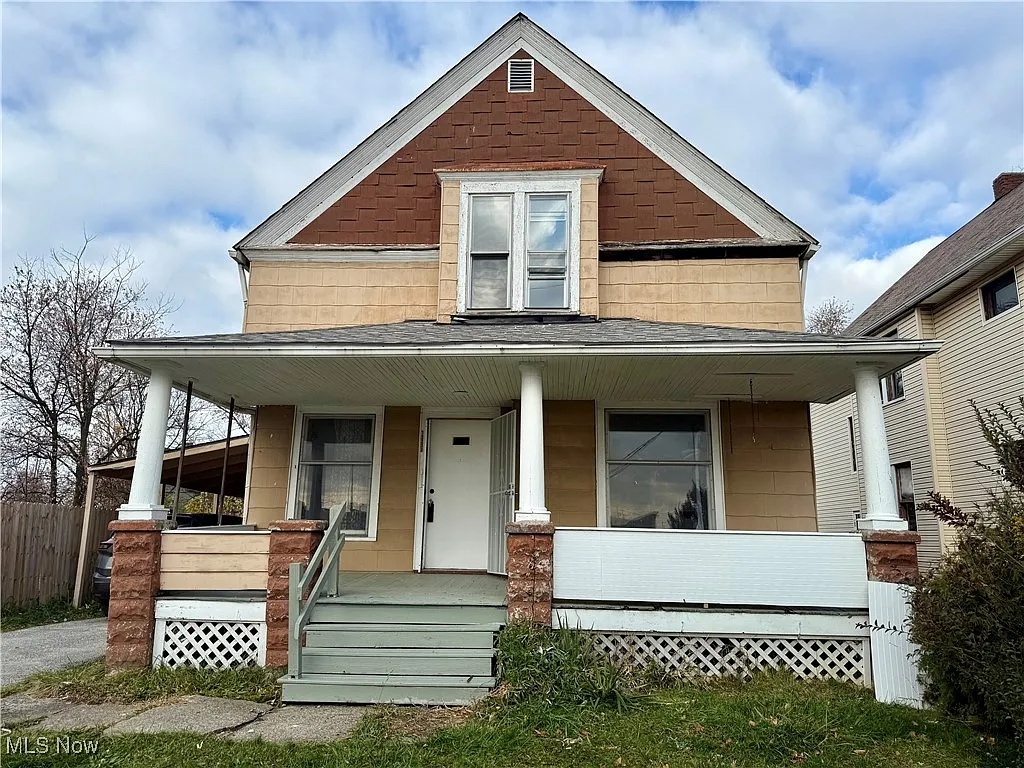
Curb appeal is your digital handshake.
The Fix: Use "Exterior Makeover".
What it does: Repaints brick/siding, updates the roof, and—crucially—fixes the landscaping.
The Strategy: Sell the "Worst House on the Best Block" narrative. Show them that with a paint job and some new grass, this house belongs in the neighborhood.
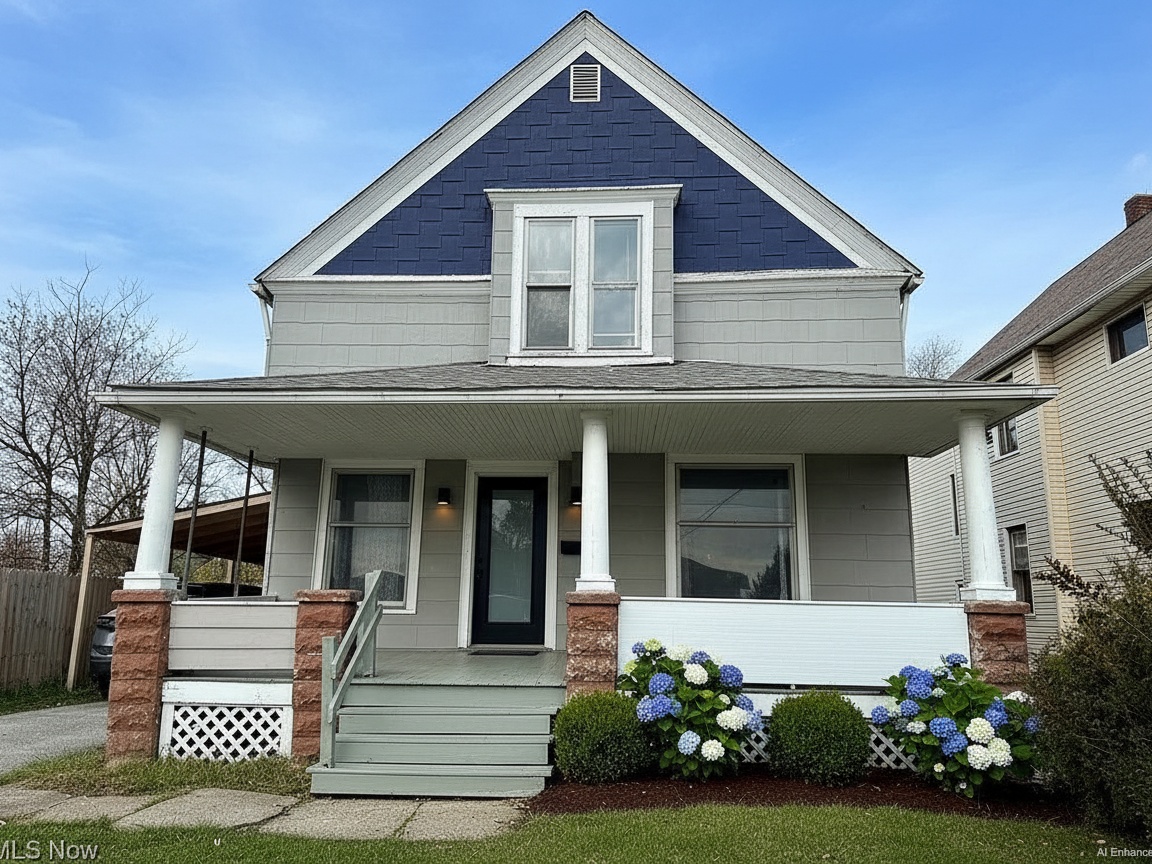
(Note: For occupied homes with clutter, use Mode 6: Virtual Declutter. It wipes the mess but keeps the big furniture, so you don't offend the seller by erasing their existence.)
5. 2026 Design Intelligence: What to Visualize
A virtual renovation is only as good as its style. If you show a buyer a grey-on-grey 2018 kitchen, you look dated. You need to hit the 2026 trends to trigger desire.
The Vibe Shift: The "Sterile White Box" is dead. 2026 is about Earth, Mood, and Warmth.
Copy/Paste Prompt Box
Use these descriptions in your Agent Lens prompts to hit the exact trends buyers want right now.
💻 EXTERIOR PROMPTS:
The "Moody" Facade: "Exterior painted in Sherwin-Williams Iron Ore, cedar wood columns, matte black window trim, Behr Rumors (ruby red) front door."
The "Organic" Facade: "Soft sage green siding, creamy white trim, natural stone skirting, native landscaping."
💻 INTERIOR PROMPTS:
Kitchen: "Warm mushroom-colored cabinets, white oak flooring, brass hardware, quartz countertops with gold veining."
Living Room: "Organic Modern style, Japandi furniture, boucle sofa, travertine coffee table, linen curtains, warm white walls."
The Color Data
Sherwin-Williams: Betting big on "Grounded" (a rich brown) and "Rain Cloud" (moody blue-grey) .
Behr: Their 2026 Color of the Year is "Rumors", a deep luxe red. Use it for front doors to create a focal point .
Benjamin Moore: Pushing "Cinnamon Slate", a heathered plum that screams sophistication .
Pro Tip: Match the style to the house. Don't put a "Modern Farmhouse" interior inside a "Mid-Century" ranch. Agent Lens has specific style selectors like Mid-Century Modern and Warm Maximalism. Use them.
6. The "Easel Strategy": Your Open House Secret Weapon
Most agents hide their virtual renovations in the MLS as photo #30. That is a waste. You need to bring the digital into the physical.
Here is the Easel Strategy—the single most effective tactic for selling fixer-uppers in 2026.
The Playbook:
Identify the Ugly: Pick the 3 worst rooms (usually Kitchen, Master Bath, Facade).
Visualize: Run them through Agent Lens (Mode 9 or 10).
Print Big: Go to FedEx or a local print shop. Print the "After" shots on 24x36 foam-core boards.
Position: Place the easel inside the room it depicts.
The Experience:
The buyer walks into the ugly kitchen. They see the orange oak cabinets. They wince. Then, they look at the easel.
They look back at the kitchen.
They look at the easel again.
The board acts as a physical "Augmented Reality" filter. You have interrupted their "flight" response. Instead of seeing a problem, they see a plan.
The Script:
Walk up to them and say:
"Hard to look past the wallpaper, right? That's why I did this. This is what the room looks like with just paint and floors—Mode 10 on my design tool. It’s about a $15k update, but it adds $40k in equity. Can you see it now?"
<img src="easel-strategy-example.jpg" alt="Easel Setup in a Living Room showing Before and After">
7. The ROI Math: Show Them the Money
To close the deal, you need to speak the language of investment.
The NAR 2026 Remodeling Impact Report is your best friend here. It tracks the "Joy Score"—how happy people are after a renovation.
Kitchen Upgrade: Joy Score 10/10
4.New Roofing: Joy Score 10/10.
ROI: A complete kitchen reno recovers ~60% of costs immediately, but the marketing value of the "potential" is what sells the home.
Create a simple flyer to hand out with your Easel Strategy:
Item | Cost (Est.) | Value Added |
|---|---|---|
List Price | $400,000 | - |
Virtual Reno Plan | $40,000 | (Kitchen, Paint, Floors) |
Total Investment | $440,000 | - |
After-Repair Value | **$500,000** | $60k Instant Equity |
Soft CTA: Want to try the Easel Strategy on your next listing? Agent Lens offers 3 free credits on signup—no credit card required. You can generate the images for your easels in less than 5 minutes.
8. The Cheat Sheet: Tool Comparison
Need to justify the switch to your broker? Here is the data.
Feature | Physical Staging | BoxBrownie (Manual) | Agent Lens (AI) |
|---|---|---|---|
Cost | $2,000+ | $24 - $176 / image | **$0.10 - $0.33 / image** |
Time | 7-14 Days | 24-48 Hours | 8-15 Seconds |
Best For | Luxury Vacant | Specific, Complex Edits | Fixer-Uppers / Volume |
Renovation? | No | Yes (Expensive) | Yes (Instant) |
The Verdict: Physical staging is for move-in ready homes. Manual editing is for one-off hero shots. Agent Lens is for volume "Potential Marketing."
9. Ethical Rules of the Road
Don't be shady. As AI gets better, transparency becomes critical.
Always Disclose: Misrepresentation is a lawsuit waiting to happen. Every virtual photo must be labeled. Agent Lens has a built-in checkbox to add an "AI Enhanced" watermark. Use it.
Stay Feasible: Don't use AI to knock down load-bearing walls unless you have a contractor's note. Stick to surfaces: paint, floors, counters.
The "Digital Twin" Link: Include a QR code on your flyer that links to a gallery showing "Before" vs "After" sliders. It builds trust.
Stop Selling the "Before"
You are sitting on inventory that isn't moving because it fails to inspire. That ends today.
You don't need a construction crew or a $50k staging budget to fix this. You just need to help the buyer see. By using tools like Agent Lens to virtually renovate and stage your listings, you turn a property's biggest liability—it's condition—into its biggest asset: Equity.
Don't let the "worst house on the block" sit on your books. Print the easels. Show the potential. Close the deal.
Ready to upgrade your marketing?
Free Real Estate Tools
Explore our free calculators and AI tools for agents:
Transform Your Listings with AI
Apply professional virtual staging and enhancements in seconds. Start transforming your listings today.
Explore Virtual Staging Options
Start with our most popular room & style combinations: