


96% of buyers judge a home by its photos instantly. If they don't stop the scroll, you lose the lead. But spending $500 on a pro photographer for every listing is a budget-killer, and waiting 48 hours for edits kills your momentum.
The truth? Your iPhone is already an MLS-grade camera. You just need to follow the Non-Negotiable Compliance Checklist:
Resolution: Minimum 1024x768 (Aim for 2048x1536).
Format: JPEG/JPG only.
Color Profile: sRGB (Standard for all web browsers).
Lens: Must use the 0.5x Ultra-Wide lens (iPhone 11 or newer).
Once you meet these specs, the only difference between you and a pro is how you handle the light.
1.Getting Wide: Your Most Important iPhone Setting
If a room looks small in your photo, buyers will naturally assume the entire house is cramped. Your primary technical goal in interior photography is to maximize the perception of space in every shot. Professionals generally aim for a wide focal length between 14mm and 24mm (full-frame equivalent) to achieve this sense of scale.7
If you own an iPhone 11 or any newer model, you already have the essential tool built-in: the Ultra-Wide lens. This setting is typically labeled $0.5x$ or $0.6x$ on your camera screen . This setting captures the necessary wide field of view to showcase interiors effectively and provide that crucial sense of depth. Always use this Ultra-Wide setting for interior shots to maximize space perception. If you rely on an older iPhone, you will need to invest in a quality external wide-angle lens, like those offered by Moment, to achieve a professional field of view.
2. The "Window Blight" Problem (And How to Fix It)
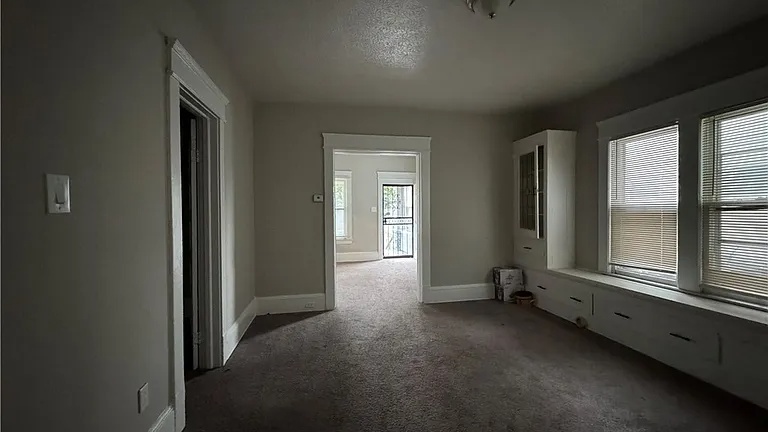
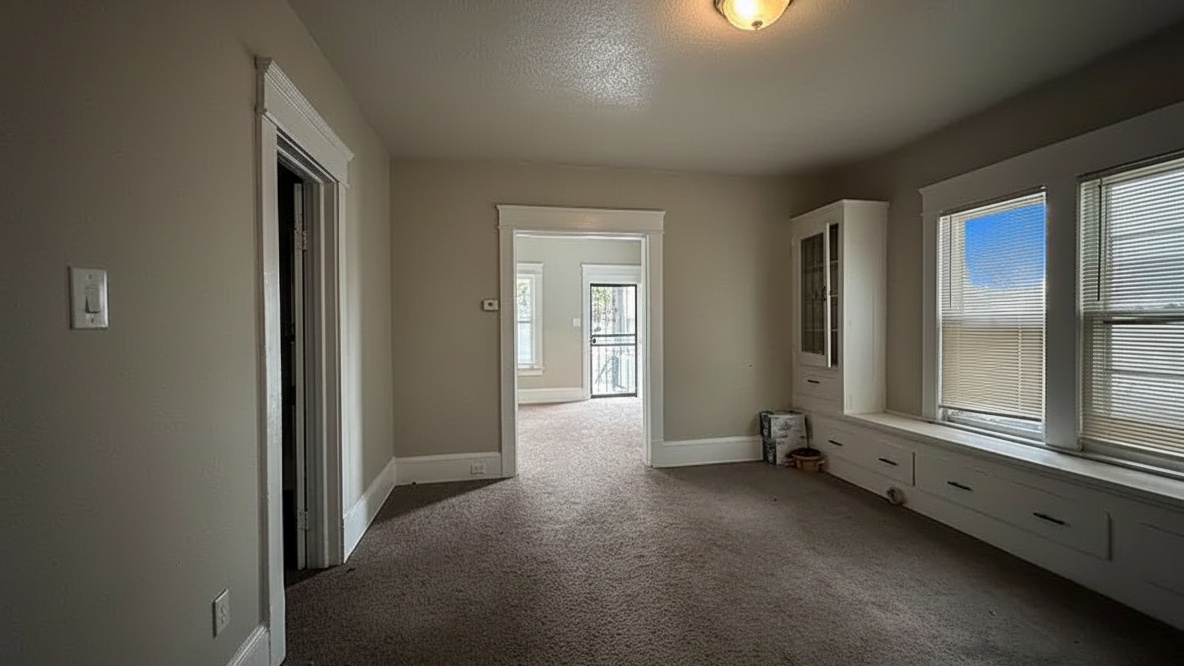
The #1 amateur mistake is Dynamic Range failure. This happens when the window view is a blinding white square, or the interior is a dark cave.
The Old Way (The "Flambient" Trap): Professional photographers use a technique called "Flambient"—blending flash and ambient light. It looks perfect, but requires expensive gear, tripods, and 30+ minutes of manual editing per room. You are an agent, not a tech editor. You don't have time for that.
The New Way (AI Automation): You need the "Flambient look" without the gear. Modern AI (like Agent Lens) replicates this balance using the raw data from your phone.
The Trick: Capture at least one well-exposed interior shot.
The Fix: The AI automatically blends the exposure, pulling detail from the dark corners and fixing the blown-out windows in seconds.
3. Beyond Filters: Enhancing with Agent Lens Classic Mode
You need a solution that works at the speed of business, not at the speed of human editing. Waiting 24 to 48 hours for human-edited photos means your property sits on the market with bad visuals, losing critical early momentum.8 The massive time savings gained by automation translates directly into listing velocity and market responsiveness.15
Let’s introduce the technological shortcut that solves the speed problem while delivering professional quality. Agent Lens is a Chrome extension that uses AI to transform real estate photography.16 It provides instant professional results without the time delay or high costs of traditional staging or outsourcing.
The Speed Advantage: AI vs. The Clock
The difference between professional AI editing and human editing is starkly quantified in time. Traditional human enhancement services, like those offered by BoxBrownie, typically require a 24-hour turnaround.1 Agent Lens, running on the Pro plan, processes your image in a lightning-fast 8 to 15 seconds [Query].
This efficiency is crucial. On the Pro plan, each image costs only $\$0.10$ to $\$0.33$, but the true value is the time saved [Query]. This instantaneous delivery kills the waiting period, making time efficiency the dominant, defining factor in your ROI.
Classic Mode: Instant Professional Polish
Agent Lens’s Classic Mode is your essential, universal enhancement tool designed to automatically apply the subtle, final professional polish required for MLS listings.16 It moves beyond simple aesthetic filters to perform crucial technical corrections.
The AI performs intelligent exposure balancing, acting as an instant HDR blender.13 It automatically brightens dark corners and skillfully pulls back details from blown-out highlights.13 Classic Mode also addresses the often flat or dull nature of raw iPhone shots. It applies a necessary professional pop—a calibrated $15\%-25\%$ saturation boost—to make colors rich, true, and welcoming without giving the image a cartoonish or artificial appearance . Finally, the mode includes essential AI cleanup and dust spot removal . This guarantees your image is flawless and free of lens smudges before it goes live.
Real Estate Photo Editing: AI vs. Human Services
Service Type | Typical Cost per Property/Image | Typical Turnaround Time | Core Technology | Key Limitation |
|---|---|---|---|---|
Traditional Physical Staging | $\$1,500$ – $\$5,000$ (per property) | 7 – 14 Days | Human Labor & Furniture | Slowest, highest cost, complex logistics [Query]. |
Traditional Virtual Staging | $\$29$ – $\$75$ (per image) | 24 – 48 Hours | Human Photoshop Editors | High cost per image, requires waiting.13 |
BoxBrownie Image Enhancement | $\$1.60$ (per image) | 24 Hours | Human Photo Editors (17-step process) | Excellent quality but 24-hour waiting period.13 |
Agent Lens (Pro Plan) | $\$0.10$ – $\$0.33$ (per image) | 8 – 15 Seconds | Advanced AI Processing (Classic Mode) | Requires good base image quality from agent [Query, 3]. |
4. The "Time Tax": Humans vs. AI
While human editors (like BoxBrownie) deliver great quality, they have a fatal flaw: Latency.
Human Editor: You upload on Tuesday. You get photos on Wednesday. You list on Thursday.
Agent Lens: You upload on Tuesday. You list on Tuesday.
In a hot market, that 24-hour gap is where leads go to die. Since the cost difference is negligible ($1.60 vs $0.33), the only metric that matters is speed. Don't use generic consumer apps or "magic erasers"—they lack the precision for MLS standards. Use a tool built specifically for real estate workflows.
5. The 3 Golden Rules of iPhone Capture
To get DSLR results, you must follow three rigid rules. If you break these, no amount of AI can save you.
Stabilization is King: Never shoot handheld. Even a micro-shake blurs the details. Buy a cheap tripod ($20) and a phone clamp. This ensures crisp lines and sharp furniture edges.
The "Belly Button" Height: Shoot from 4.5 feet high (roughly chest/belly level). This mimics the natural eye line. Shooting from too high makes the room look small; too low makes it look like a dollhouse.
Vertical Discipline: Turn on your camera "Grid" settings. Align the vertical grid lines with the door frames or room corners. If your vertical lines aren't straight, the house looks like it's falling over.
Lighting: The Foundation for Classic Mode Success
Always maximize ambient light by turning on every light fixture in the room before you shoot. While this often results in mixed light sources—like bright daylight from windows clashing with warm, yellow light from interior incandescent bulbs—the AI in Classic Mode is designed to handle this complexity.
The AI automatically balances the light by executing a complex white balance correction.13 It adjusts the color temperature so that true whites look white, even with challenging mixed sources. This automatic correction saves you hours of manual color adjustment and is essential for consistent results. Ensuring true color representation is critical, especially when showcasing trendy colors like Deep Navy Blues or Creamy Off-Whites . Learn more about common composition mistakes in our guide to [Maximizing Curb Appeal with Exterior Makeover Mode].
6. Workflow and Compliance: From Capture to Click
The efficiency of the iPhone + Agent Lens pairing is realized through a disciplined, streamlined workflow. This final section provides the actionable steps you need to follow and reiterates the mandatory compliance checks necessary to ensure MLS acceptance.
The 4-Step iPhone + Agent Lens Workflow
Stage & Stabilize: Declutter the space first. Set up your phone on a tripod and utilize the $0.5x$ Ultra-Wide lens.
Shoot & Bracket: Capture your HDR-ready shot, ensuring the composition follows the $50/50$ rule and all verticals are perfectly straight.
Enhance Instantly with Classic Mode: Upload the image to Agent Lens. Select Classic Mode.16 Wait 8 to 15 seconds for the AI to perform exposure balancing, color boost, and cleanup. Download the professional, enhanced JPEG file.
List Immediately: Upload the final JPEG to your MLS platform for instant market exposure.
The Pre-Upload Quality Check
Even with powerful AI tools, professionalism requires one final compliance check. Always confirm that the final, enhanced image meets the MLS size requirements, ideally the recommended 2048x1536 resolution, and is saved as a JPEG using the sRGB profile.3
While Classic Mode enhances saturation and brightness, the tool is built for natural, realistic results. You must ensure the final image is balanced and avoids the overly-processed "HDR look" that can confuse or deter buyers.9 This focus on quality control minimizes the risk of MLS rejection and preserves the necessary buyer trust. For tips on showcasing difficult properties, check out our guide on.
Conclusion
Stop letting a 24-hour editing window kill your market momentum.
The days of needing thousands in DSLR gear or enduring long human editing turnarounds are definitively done. By mastering simple iPhone techniques—like consistent stabilization, using the Ultra-Wide lens, and ensuring straight composition—you capture the professional raw material.
Agent Lens's Classic Mode takes that raw capture and delivers MLS-grade, perfectly polished results in under 15 seconds. High-quality listing images aren't a luxury; they are a non-negotiable operational necessity that drives immediate buyer interest and separates you from the competition. Stop waiting days for edits. Start listing immediately.
Ready to upgrade your marketing?
Free Real Estate Tools
Explore our free calculators and AI tools for agents:
Transform Your Listings with AI
Apply professional virtual staging and enhancements in seconds. Start transforming your listings today.
Explore Virtual Staging Options
Start with our most popular room & style combinations: