


It’s late 2026. You are standing at a crossroads, credit card in hand. Do you buy the "Ferrari" of the industry—the $6,000 Matterport Pro3 with its spinning LiDAR and monthly subscription fees? Or do you buy the "Swiss Army Knife"—the $1,000 Ricoh Theta Z1 that fits in your pocket?
Stop looking at the spec sheets. This isn't just a hardware choice about megapixels or sensors. It’s a choice between two opposing business models.
One offers automation and consistency but rents you your own data forever. The other offers freedom, higher margins, and asset ownership, but demands you learn a few skills.
We audited the workflows, the "hidden" hosting fees, and the recent billing controversies to help you decide: Are you building a scalable factory, or a profitable brand?
Here is the math nobody shows you.
1. David vs. Goliath: The Hardware Reality
When you compare these two, you aren't comparing apples to apples. You're comparing a specialized industrial scanner to a high-end optical camera.
The Matterport Pro3: The LiDAR Beast
The Pro3 is designed for one thing: speed and scale. Unlike the older Pro2, which went blind in direct sunlight, the Pro3 uses LiDAR (Light Detection and Ranging). It shoots millions of laser pulses to measure the distance to every object.
The Good: It works outdoors. You can scan a pool deck or a parking lot in full sun without the data falling apart.1 It’s fast (under 20 seconds per sweep).
The Bad: It’s heavy. It requires a Pelican case. You don’t just "pop by" a listing to scan; it’s a production.
The Vibe: You look like a scientist. Sellers love the spinning laser. It justifies a high fee.
The Ricoh Theta Z1: The Pocket Powerhouse
Don't let the size fool you. The Z1 packs dual 1-inch sensors—the same size sensor found in high-end compact cameras like the Sony RX100. Most 360 cameras use tiny phone-sized sensors that turn into grain in dark hallways. The Z1 captures light, not just data.
The Good: Incredible dynamic range. It shoots RAW (DNG) files, meaning you can recover blown-out windows and brighten dark corners in post. It fits in your pocket.
The Bad: The battery is non-removable and small. If you're shooting a commercial building, you need an external power bank. It overheats if you shoot 4K video for too long.
The Vibe: It’s stealthy. You can shoot a bathroom by setting the timer and leaning out the door.
At a Glance:
Feature | Matterport Pro3 | Ricoh Theta Z1 | The Bottom Line |
|---|---|---|---|
Price | ~$5,995 | ~$1,000 - $1,100 | One requires a loan; the other is an expense. |
Tech | LiDAR + 20MP Sensor | Dual 1-inch CMOS | Pro3 measures geometry; Z1 captures light. |
Outdoor | Excellent (LiDAR) | Visual Only | Pro3 creates a 3D mesh of the yard; Z1 just takes a photo. |
Battery | Swappable | Built-in (60 mins) | Pro3 is for all-day shoots; Z1 needs a power bank. |
Hosting | Locked (Subscription) | Open (Your Choice) | This is the dealbreaker. |
2. The Economics: The "Walled Garden" Trap
This is where you win or lose money. The hardware cost is just the tip of the iceberg. The real cost of a 3D tour business is hosting.
The Matterport Subscription Model
Matterport operates on a SaaS (Software as a Service) model. Once you scan a house, that data lives on Matterport's servers. You cannot take the "dollhouse" data and host it on your own website. You are renting the view.
The Monthly Bleed: A standard Business plan is ~$300/month for 100 active spaces.
The Reactivation Fee: This is the hidden tax. If you archive a listing (to save space) and need to turn it back on later for a portfolio or a resale, Matterport charges ~$9.99 per space to reactivate it.
The "Hostage" Data: If you stop paying, your tours go dark. Your entire portfolio vanishes.
⚠️ 2026 WARNING: The Billing Glitch
In mid-2026, a migration error in Matterport’s billing system reportedly triggered massive erroneous charges for some users, freezing business accounts and causing chaos.6 Relying on a single centralized provider puts your financial plumbing at their mercy.
The Ricoh Theta Z1 "Open Road"
The Z1 produces standard image files (JPEG/DNG). You own them. You can upload them to any platform you want.
CloudPano: Often offers "Lifetime Deals" or flat monthly fees. You can white-label the tour (your logo, not theirs) and keep 100% of the revenue.
Kuula: Known for the smoothest player and sharpest image rendering. Costs ~$20/month for unlimited uploads.
3DVista: Buy the software once (~$600), host the files on your own server (Amazon S3). Zero monthly fees forever.
🧾 The Receipt: 3-Year Total Cost of Ownership (100 Tours)
Option A: The Matterport Factory
Hardware: $5,995
Hosting ($296/mo x 36): $10,656
Reactivation Fees (Est): $300
Total: ~$16,951
Option B: The Ricoh Independent
Hardware: $1,100
Hosting (CloudPano Lifetime): ~$797
Total: ~$1,897
The Math: The Matterport route costs 8x more over three years. Unless you need survey-grade accuracy for architects (BIM files), that is $15,000 of profit you are setting on fire.
3. The "Hero Shot" Problem (And How to Solve It)
Here is the dirty secret of 3D tours: Buyers don't click on them first.
On Zillow or the MLS, buyers click on the "Hero Image"—the main still photo of the living room or exterior. If that photo looks dark or distorted, they scroll past. They never even see your expensive 3D tour.
Matterport's Weakness: When you extract a 2D snapshot from a Matterport tour, it is low resolution (often 1080p). It looks soft and "video-gamey" on a large monitor.
Ricoh's Weakness: While the Z1 shoots RAW, wide-angle lenses distort rooms. Plus, you often capture the mess—the seller's boxes, the brown grass, or the dated furniture.
You need a workflow to turn these scans into magazine-quality thumbnails without hiring a retoucher.
Enter Agent Lens: The AI Fix
Agent Lens is a Chrome extension that solves the "Hero Shot" problem instantly. It allows you to take a snapshot from your tour (Matterport or Ricoh) and transform it using AI directly in your browser.
Here is how smart agents are pairing the Z1 with Agent Lens to save thousands on staging and editing:
1. The "Tenant Mess" Fix
You scan a rental property with your Z1. There are boxes, dishes, and clutter everywhere.
Old Way: Pay an editor $15/image to remove items. Wait 24 hours.
Agent Lens Way: Use Mode 6: Virtual Declutter. The AI identifies "clutter" (boxes, trash, personal items) and wipes it away while keeping the major furniture (couches, tables). It rebuilds the floor and walls instantly.
Cost: ~$0.20 per image. Time: 10 seconds.
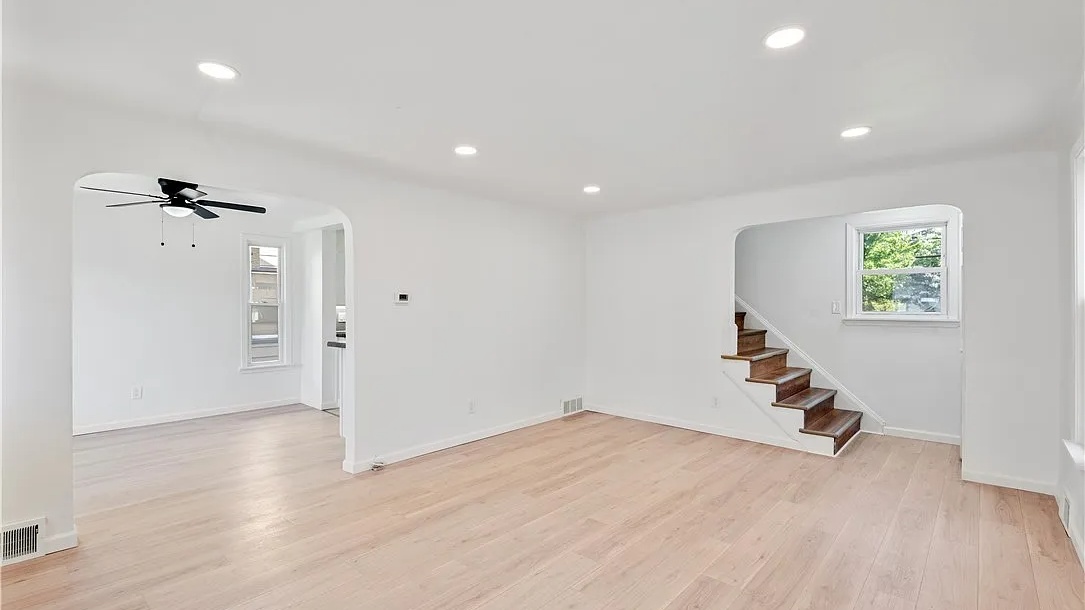
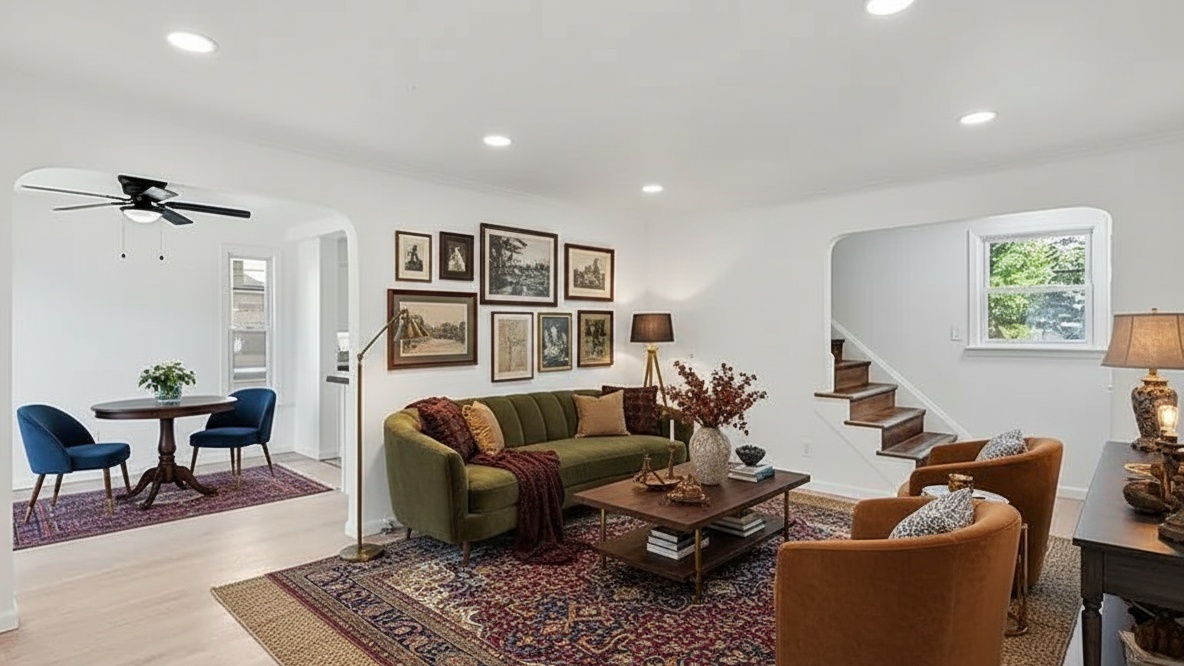
2. The Empty Room "Vibe Check"
You scan a vacant flip. It feels cold and small.
Old Way: Pay $30/photo for virtual staging.
Agent Lens Way: Use Mode 1: Organic Modern. The AI reads the room's perspective and drops in trendy, Japandi-style furniture—linen sofas, light woods, bouclé chairs.
Pro Tip: Selling a historic home? Switch to Mode 4: Warm Maximalism for deep velvets and moody luxury. Selling a suburban tract home? Use Mode 3: Modern Farmhouse for that "Magnolia" look.
3. The "Curb Appeal" Rescue
You scanned the exterior with your Z1, but it’s overcast and the driveway is stained.
Agent Lens Way: Use Mode 7: Curb Appeal Pro. It replaces the gray sky with a blue twilight sky, greens up the dead grass, and cleans oil stains off the driveway—without altering the house itself (keeping you MLS compliant).
4. Competitor Check: Why Not BoxBrownie?
You might be thinking, "I'll just send the photos to BoxBrownie." They are the industry giant, after all.
Feature | BoxBrownie | Agent Lens |
|---|---|---|
Speed | 24-48 Hours | 10-30 Seconds |
Cost | $24+ per image | $0.10 - $0.33 per image |
Control | You get what they send back. | You iterate instantly. Don't like the rug? Click again. |
Workflow | Upload, checkout, wait, download. | Right-click in Chrome browser. Done. |
The Takeaway: BoxBrownie is great if you need manual, human-verified edits for a luxury billboard. For daily listing marketing, Agent Lens is faster, cheaper, and gives you immediate control.
5. The Verdict: Who Are You?
Stop overthinking the specs. The decision comes down to your business model.
Buy the Matterport Pro3 IF...
You run a factory. You have 5 junior photographers scanning 50 homes a month. You need a foolproof, automated workflow where nobody has to think.
You serve Architects/Construction. You need accurate point clouds (.E57 files) and BIM data. The Z1 cannot do this.
You have a massive budget. The $16k+ TCO is just the cost of doing business for you.
Buy the Ricoh Theta Z1 IF...
You care about profit margins. You want to keep that $15,000 difference in your pocket.
You want to own your assets. You refuse to pay "rent" on your own work.
You are a marketer. You want to edit the photos, white-label the tour, and control the branding.
Our Recommendation for 2026:
For 90% of residential real estate agents and photographers, the Ricoh Theta Z1 combined with Agent Lens is the winning combo.
You get the 3D tour for a fraction of the cost, and you use Agent Lens to turn those raw scans into stunning, staged, decluttered Hero Shots that actually stop the scroll.
Ready to upgrade your workflow?
Don't let a raw scan be your final product.
Install Agent Lens Extension – Get 3 Free Credits
Free Real Estate Tools
Explore our free calculators and AI tools for agents:
Transform Your Listings with AI
Apply professional virtual staging and enhancements in seconds. Start transforming your listings today.
Explore Virtual Staging Options
Start with our most popular room & style combinations: