

Introduction
Forget "curb appeal." In 2026, the battle is won or lost before a buyer ever steps foot in the driveway.
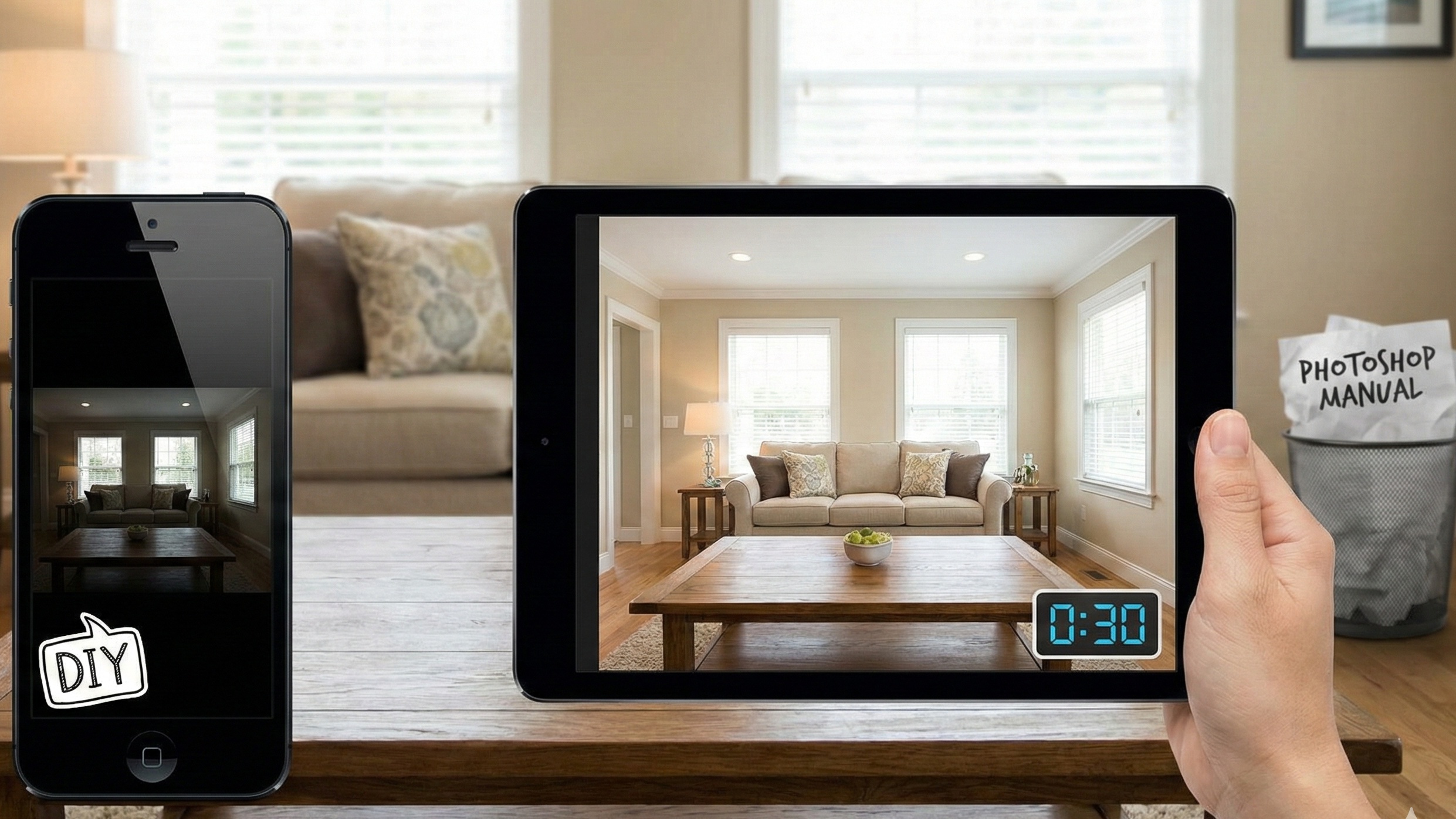
Data shows you have exactly 20 seconds to capture a buyer's attention on a mobile screen. If your cover photo is dark, crooked, or blurry, they don't just scroll past the house—they scroll past you.
We analyzed over 100 industry sources to separate the "nice-to-haves" from the "need-to-haves." The verdict? High-fidelity visual marketing isn't an operational expense anymore. It is the single highest-ROI lever you have to control Days on Market (DOM) and defend your commission.
Here is how to master the Visual Economy without wasting hours in Photoshop.
1. The Math is Scary: Why You Can't Afford "Free" Photos
You might think taking photos yourself saves you $200. It doesn't. It costs you thousands.
The market has bifurcated into two camps: listings that are visually optimized and listings that are ignored. The difference isn't subjective; it’s mathematical. Listings with professional-grade photography sell 32% faster than those with amateur imagery.
Let’s break down what that speed looks like in hard dollars for your seller:
The Cost of "Sitting"
Amateur Photos: 123 Days on Market (Average)
Pro Photos: 89 Days on Market (Average)
Difference: 34 Days
The Calculation: If a home has carrying costs (Mortgage + Tax + Insurance + Utilities) of $4,000/month:
34 Days x Daily Carry Cost = ~$4,500 Cash Saved
By getting the home sold a month faster, the professional photos pay for themselves 10x over before we even talk about the sale price. And speaking of price: homes marketed with high-end visuals command a 47% higher asking price per square foot.
2. 7 Amateur Mistakes That Scream "Part-Time Agent"
You don't need to be a pro photographer, but you do need to stop committing these specific visual crimes. They are the primary reasons buyers swipe left.
Mistake #1: The "Keystone Effect" (Crooked Walls)
The dead giveaway of an amateur photo isn't the resolution; it's the geometry. In real life, walls are vertical. But when you tilt your phone camera up to capture a cathedral ceiling or down to show the hardwood, the vertical lines converge. The room looks like it's falling backward.
The Fix: Shoot from waist height (approx. 40 inches), not eye level. Keep the camera perfectly level with the ground. If you must tilt, you must correct it in post-production.
Mistake #2: The Yellow Tint (Bad White Balance)
Ever notice how your indoor photos look "sickly" or orange? That’s color temperature mismatch.
Daylight (Windows): Blue light (5500K)
Interior Bulbs (Tungsten): Orange light (3000K)
When you shoot with the lights on, your camera gets confused. It either turns the windows bright blue or the room bright orange. The Fix: Turn off the interior lights. Yes, really. Shoot with natural light only, or use a "Flambient" technique (Flash + Ambient) to overpower the orange bulbs.
Mistake #3: The "Toilet Lid" Incident
It sounds trivial, but it’s the number one complaint from buyers regarding bathroom photos. An open toilet seat signals "carelessness" and "sanitary neglect". The Fix: Put the lid down. Remove the plunger. Hide the toothbrushes.
Mistake #4: The Vampire Mirror
Capturing your own reflection (or your flash) in the bathroom mirror destroys the illusion. It breaks the "fourth wall" and reminds the buyer they are looking at a photo, not a home. The Fix: Angle your shot from the doorway so you aren't directly in front of the glass.
Mistake #5: Oversaturated HDR (The "Radioactive" Look)
In an attempt to make photos "pop," many agents crank the HDR (High Dynamic Range) settings. The result is glowing window frames, neon green grass, and fuzzy shadows. Buyers hate this—it feels fake and manipulative. The Fix: Aim for "natural" editing. You want the view out the window to be visible, but not clearer than the room itself.
3. The Solution: Outsourcing vs. AI (The "Agent Lens" Advantage)
Once you've snapped the photos, you have three choices: spend your Sunday night editing in Lightroom, pay an overseas editor, or use AI.
Option A: The Human Editor (BoxBrownie, Phixer, PhotoUp)
Outsourcing is better than DIY, but it comes with friction.
BoxBrownie
Pros: Reliable, huge menu of services.
Cons: Slow. 24-hour turnaround for basic edits, 48 hours for staging.
Cost: ~$1.60 per image.
The Gripes: "Results are all over the place," and "Virtual staging can look fake".
Phixer
Pros: Fast mobile app.
Cons: Revision Fees. Users report getting hit with $10 charges just to fix a small error.
The Gripes: "Revision costs quickly add up".
PhotoUp
Pros: Dedicated editors for consistent style.
Cons: Complex setup. It's a relationship, not a quick fix.
Option B: The AI Solution (Agent Lens)
This is where 2026 tech changes the game. You don't need to wait 24 hours to fix a crooked wall or brighten a dark room.
Agent Lens is a Chrome extension designed specifically for this workflow. It uses computer vision to instantly correct the "Amateur Mistakes" we just listed.
The Weapon of Choice: Agent Lens "Classic Mode" Instead of waiting for BoxBrownie to return your photos tomorrow, Classic Mode runs locally in your browser:
Auto-Straighten: Instantly fixes the "Keystone Effect" so walls are perfectly vertical.
White Balance Correction: Neutralizes that nasty yellow tungsten glow and balances it with natural window light.
Blue Sky Injection: Turns gray, rainy skies into soft blue afternoons without looking radioactive.
Cost: $0.10 - $0.33 per image (vs. $1.60+).
Speed: 30-45 seconds per image.
How it fits your workflow:
Shoot the property with your iPhone 15 Pro or DSLR (waist height!).
Upload to Agent Lens.
Select Classic Mode.
Download MLS-ready images in under 2 minutes.
How it works:
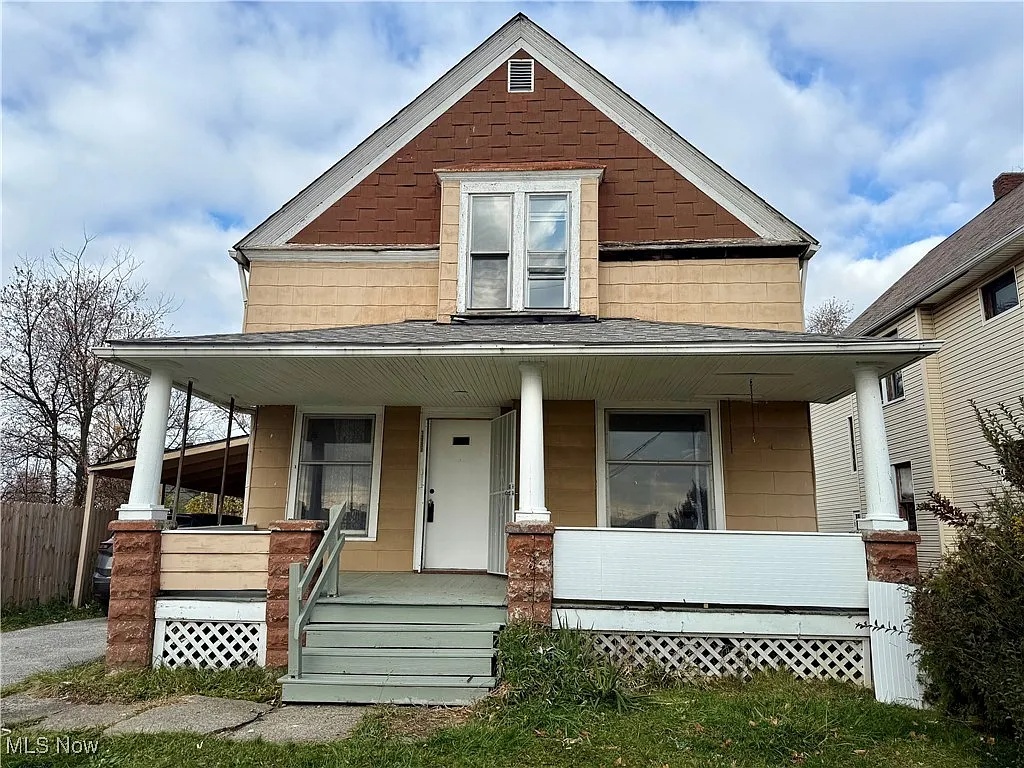
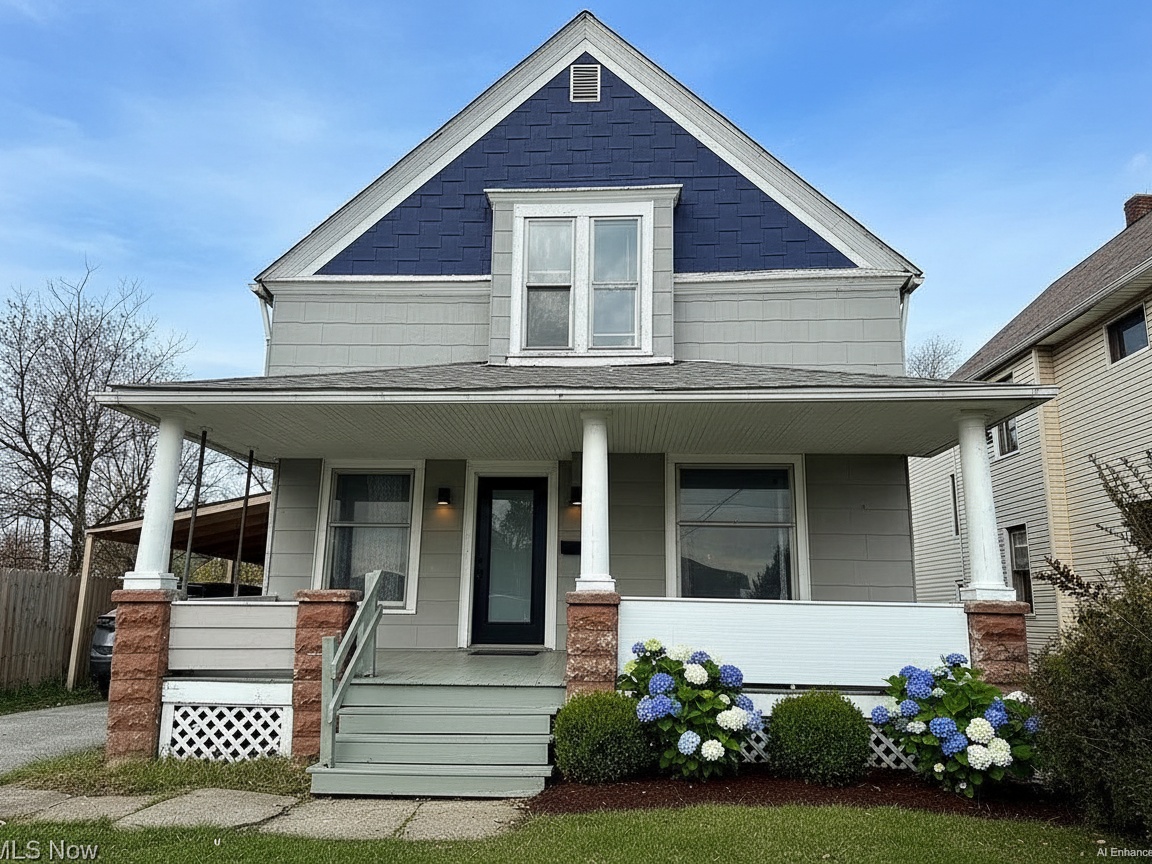
No waiting for emails from overseas. No $10 revision fees. You fix the geometry and lighting instantly and get the listing live.
4. Virtual Staging: Don't Let Empty Rooms Kill the Vibe
Empty rooms feel smaller than furnished ones. It's a weird optical illusion, but it's true. 90% of buyers cannot visualize furniture in a vacant space.
The Old Way (Physical Staging):
Cost: $1,500 - $5,000 upfront + monthly rental fees.
Time: 7-14 days to coordinate movers and designers.
The New Way (Agent Lens):
Cost: Credits system (fraction of physical staging).
Time: Seconds.
If you have a vacant listing, use Agent Lens Virtual Staging. But be careful with the style. Don't put "Modern Farmhouse" furniture in a sleek downtown condo.
Mid-Century Modern: Perfect for ranches and bungalows.
Organic Modern: Safe bet for almost any contemporary home (neutral tones, Japandi style).
Magic Eraser - Empty Room: If the seller has ugly furniture, use this mode first to wipe the room clean, then stage it virtually.
Pro Tip: Always disclose. Mark photos as "Virtually Staged" in the MLS to avoid ethical complaints.
5. Trends: Vertical Video is Mandatory
Static photos are the baseline. The "Scroll Stopper" in 2026 is vertical video.
TikTok and Instagram Reels have trained buyers to consume content in a 9:16 format.
The Stat: 73% of homeowners are more likely to list with an agent who uses video.
The Move: Don't just post the slideshow. Walk through the home with your phone vertically. Capture the "vibe"—the water pouring from the faucet, the fire in the fireplace, the view from the deck.
The Edit: Keep it under 60 seconds. High energy.
6. Your "Visual Assets" Checklist
Stop guessing. Use this tiered strategy to ensure every listing—from the $200k fixer to the $2M estate—gets the treatment it deserves without blowing your budget.
✅ Tier 1: The Baseline (Every Listing)
Photography: 25+ Photos (Professional or Agent Lens Classic Mode).
Geometry Check: All vertical lines straightened.
Lighting: Blue skies added, yellow casts removed.
Floor Plan: Mandatory for Zillow ranking.
✅ Tier 2: The Standard (Mid-Market)
Includes Tier 1
Virtual Staging: Stage the "Big 3" (Living Room, Primary Bed, Dining).
Virtual Twilight: One hero shot of the exterior at dusk (Agent Lens can do this).
Vertical Video: 30-second reel for Instagram/TikTok.
✅ Tier 3: The Luxury (High-End)
Includes Tier 2
Drone: Aerial video and context shots.
3D Tour: Matterport or similar.
Physical Staging: If the budget allows, nothing beats real furniture for the physical showing.
Conclusion: Stop "Taking Pictures" and Start Building Assets
The era of the "point-and-shoot" agent is over. In a market this crowded, your visual assets are the only things doing the selling while you sleep.
Buyers are judging your competence by the straightness of your vertical lines and the brightness of your interiors. Don't give them a reason to doubt you.
Whether you leverage Agent Lens Classic Mode to automate the heavy lifting for pennies on the dollar, or hire a top-tier pro for your luxury listings, the standard has shifted. Audit your current listings today, upgrade your visual toolkit, and watch your Days on Market drop like a stone.
Ready to upgrade your marketing?
Install Agent Lens Extension – Get 3 Free Credits
Free Real Estate Tools
Explore our free calculators and AI tools for agents:
Transform Your Listings with AI
Apply professional virtual staging and enhancements in seconds. Start transforming your listings today.
Explore Virtual Staging Options
Start with our most popular room & style combinations: